請輸入想查詢的單字或片語
    Footer
    Download on the App StoreGet it on Google Play

    關於

    • 認識 VoiceTube
    • 學習服務介紹
    • 加入我們
    • 常見問題
    • 熱門搜尋主題
    • 企業英文培訓
    • 社群推廣分潤計畫

    服務總覽

    • 口說挑戰
    • 單字單句本
    • Hero 智能學習
    • Tutor 真人家教
    • Vclass 名師課程
    • Campus 教育版
    • 字典查詢
    • 匯入影片並生成字幕
    • 部落格

    精選頻道

    影片分級

    • A1 初級
    • A2 初級
    • B1 中級
    • B2 中高級
    • C1 高級
    • C2 高級

    隱私權˙條款˙
    ©2026 VoiceTube Corporation. All rights reserved

    dropdown

    US

    ・

    UK

    A1 初級
    n.名詞下拉式選單
    The website features a dropdown menu for easy navigation.
    n.名詞下拉列表
    Select your country from the dropdown list.
    adj.形容詞下拉式的
    The dropdown selection allows users to choose their preferred language.

    影片字幕

    如何使用 Google 文檔 | Tech Insider (How To Use Google Docs | Tech Insider)

    04:17如何使用 Google 文檔 | Tech Insider (How To Use Google Docs | Tech Insider)
    • Add an image by clicking on insert image, and find the file from the dropdown options.

      點擊插入圖片添加圖片,然後從下拉選項中找到文件。

    • To change the margins of a document in Google Docs, go to file and page setup from the dropdown, update the values in the margins text field, you can also set the margins to this for all future Google Docs by clicking here.

      要更改 Google 文檔中文檔的頁邊距,請從下拉菜單中進入文件和頁面設置,更新頁邊距文本資料欄中的值。

    B1 中級

    如何創建自定義 GPT | OpenAI 教程 (How to Create Custom GPT | OpenAI Tutorial)

    20:26如何創建自定義 GPT | OpenAI 教程 (How to Create Custom GPT | OpenAI Tutorial)
    • Over on the left-hand side, you now need to type in your open API schema, and if you click on this dropdown, you can see a few different examples.

      在左側,你現在需要鍵入你的開放式 API 模式,如果點擊這個下拉菜單,你可以看到一些不同的示例。

    B1 中級

    如何在 Google 文檔中更改頁邊距 | Tech Insider (How To Change Margins In Google Docs | Tech Insider)
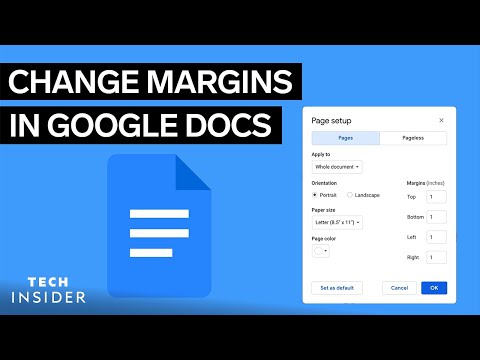
    00:32如何在 Google 文檔中更改頁邊距 | Tech Insider (How To Change Margins In Google Docs | Tech Insider)
    • Go to file and page setup from the dropdown.

      從下拉菜單中進入文件和頁面設置。
    B1 中級

    胡迪尼並不可怕--第二部分:物品 (Houdini Isn't Scary - Part 2: Objects)

    25:48胡迪尼並不可怕--第二部分:物品 (Houdini Isn't Scary  - Part 2: Objects)
    • At the top of this delete node in your parameters, you'll notice that it has this group dropdown.

      在參數中刪除節點的頂部,你會發現有一個組下拉菜單。

    B1 中級

    安靜害羞的人如何將尷尬的人際交往變成牢固的人際關係 | Selena Soo (How Quiet and Shy People Can Turn Awkward Networking into Strong Relationships | Selena Soo)

    42:40安靜害羞的人如何將尷尬的人際交往變成牢固的人際關係 | Selena Soo (How Quiet and Shy People Can Turn Awkward Networking into Strong Relationships | Selena Soo)
    • then there's like a dropdown box, whether it's like, I invited them, whether they're checking so they responded to me, but

      然後有一個下拉式選單,看是我邀請的,還是他們已經回覆我了,

    A2 初級

    Gemini 3 突破視覺界限! (Gemini 3 Pushes Visual Boundaries)

    12:43Gemini 3 突破視覺界限! (Gemini 3 Pushes Visual Boundaries)
    • But I really wanted to get access to it and I don't have access to it in my dropdown.

      但我真的很想存取它,而且我的下拉選單裡沒有。

    B1 中級

    烘焙新知 | 土撥鼠工具包 5 (What’s New In Baking | Marmoset Toolbag 5)

    13:10烘焙新知 | 土撥鼠工具包 5 (What’s New In Baking | Marmoset Toolbag 5)
    • Alternatively, to look at a breakdown of baked textures individually, we can enable bake project passes from the viewport dropdown.

      另外,如果想單獨查看已烘焙貼圖的明細,我們可以從視窗下拉清單中來傳遞烘焙項目。

    • You can find these modes in the viewport render quality dropdown here.

      您可以在視窗渲染品質下拉清單中找到這些模式。

    B2 中高級

    使用 Bolt 與 Cursor 進行人工智能氛圍編碼 (AI vibe coding with Bolt vs. Cursor)

    10:38使用 Bolt 與 Cursor 進行人工智能氛圍編碼 (AI vibe coding with Bolt vs. Cursor)
    • This tab will control which models show up in this dropdown.

      該選項卡將控制哪些型號顯示在下拉菜單中。

    B1 中級

    Microsoft 365 教程 - 與團隊共享文件 (Microsoft 365 Tutorial - Sharing files with your team)

    04:59Microsoft 365 教程 - 與團隊共享文件 (Microsoft 365 Tutorial - Sharing files with your team)
    • By clicking the dropdown, you could choose specific teammates, which would make it private.

      通過點擊下拉菜單,您可以選擇特定的隊友,這將使其成為私人資訊。

    B1 中級

    12 分鐘內掌握 85% 的谷歌雙子座 (2025) (Master 85% of Google Gemini in 12 Minutes (2025))

    11:5012 分鐘內掌握 85% 的谷歌雙子座 (2025) (Master 85% of Google Gemini in 12 Minutes (2025))
    • Clicking into the dropdown in the top left here, you'll see that I intentionally blurred out the model numbers because they change too quickly, right?

      點擊左上角的下拉菜單,你會發現我有意模糊了型號,因為它們變化太快了,對嗎?

    B1 中級